Android Tablets Vs. iPad

Android Tablets vs. iPad - this may well become the big tech debate of 2011. I will break down the differences for you and tell you what side I am on! There are several key differences between the two devices -

Tablet Android

Operating System

Tablet Android

Obviously, one of the largest differences between the two systems is the operating system. Android tablets are running on some version of the Android OS from Google, while Apple's iPad is running on Apple's iOS. Both are the same basic OS that runs on the companies' respective smart phones.

To me, this is just a matter of preference. These days, many developers prefer Android over iOS, as it is much easier to get a new app into Android's app market. However, every Android tablet (and phone) may run on a different version of the software, which can make it a bit unsettling for users, as some apps may work only on a newer version of Android, which every tablet may not get.

The companies that develop the tablets decide when to push an update of the Android software to each type of device, so one type might get an update, while others may wait for months, or never get an update at all.

As far as I am concerned, there is no clear winner in this arena. If you get a chance, try each one and see which operating system you like best. Personally, I am a bigger fan of Android.

Screen Size

Having a big screen can be a plus or a minus depending on what you plan to use it for, and especially on how you plan to carry a tablet around. For example, I purchased the Samsung Galaxy Tab, considered one of the best Android tablets currently on the market, and a big selling point for me ws the screen was actually much smaller than the iPad.

The iPad screen is over 10 inches, making almost as big as some small laptops. That can be great if you plan to carry it in a backpack all the time and want to watch videos on it, but it does make it harder to carry around. For me, the Galaxy Tab made more sense because I don't carry a backpack and like to bring it to meetings.

So, again, no clear winner here. You may want to decide first whether you want a wireless device that is portable or if you want the biggest screen possible. One caveat here, however - soon there will likely be tablets running Android on the market that have screens the size of the iPad.

Apps

You can have a discussion about Android tablets vs. iPad without talking about apps. Apps make or break the tablet in my opinion. Having used both operating systems extensively, I will say that, although the iPad certainly has more apps than Android, I have not been disappointed with Android and can find just about any kind of app I can think of. In addition, almost every company that makes an iPad app makes an Android app as well.

In fact, in my estimation, given that Android sales are now surpassing iPhone, and the fact I mentioned above - that it is easier to develop apps and get in the Android market, I would not be surprised to see Android catch up the Apple in the future when it comes to apps.

Cost

It seems that even the best Android tablets are cheaper overall, and you can find some good, cheap Android tablets out there. Both have data plans, and you can't do much without a data plan on a tablet unless you stay in a wifi zone, so you will likely end up paying about the same there.

However, when it comes to the cost the device itself, Android wins.

This argument will rage on during 2011, but when it comes to Android Tablets vs. the iPad, I am all for Android!
Android Tablets Vs. iPad
Tablet Android

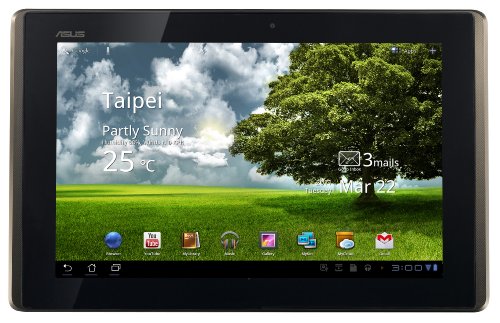
ASUS Eee Pad Transformer TF101-A1 10.1-Inch Tablet Computer (Tablet Only)
Click for larger image and other views

ASUS Eee Pad Transformer TF101-A1 10.1-Inch Tablet Computer (Tablet Only) Feature

  • 10.1" WSVGA (1280x800) IPS Capacitive LED Touchscreen; Android 3.2 Operating System
  • NVIDIA Tegra 2 CPU; 1GB of DDR2 SDRAM, 1 slot, 1GB Max; 16GB Internal Flash Memory; Wireless 802.11bgn; Bluetooth 2.1
  • Mini HDMI Port; Micro SD Card Slot; 1.2MP (front) and 5.0MP (rear) Webcam
  • GPS; Gravity Sensor; E-Compass; Light Sensor; Gyroscope; 24.4Wh Lithium Polymer Battery (Up to 9.5 Hours Battery Life)
  • 40-Pin Docking Port for Optional Keyboard (Keyboard Not included)/Docking Station (Model Name: TF101 DOCKING)


ASUS Eee Pad Transformer TF101-A1 10.1-Inch Tablet Computer (Tablet Only) Overview

With a slim, lightweight design and a 10.1-inch WSVGA IPS capacitive display made from durable and scratch-resistant glass that is viewable at angles up to 178°, the versatile Eee Pad Transformer is the perfect tablet for anyone who want to enjoy multimedia on the move, but still wish to have easy access to the web, email, and other productivity applications. A custom user interface provides easy access to the many features of the Android 3.2 (Honeycomb) operating system, while the NVIDIA® Tegra™ 2 chipset provides full support for Adobe® Flash® 10.2,1 smooth HD video conferencing and playback, a lightning fast web experience, and incredible mobile gaming performance. Front and rear cameras make for easy video chat and digital photography, which can be played back in video on HDTVs via a mini HDMI output port, making it a true mobile entertainment device.

ASUS Eee Pad Transformer TF101-A1 10.1-Inch Tablet Computer (Tablet Only) Specifications

Some things are meant to go together
Transforming the Conventional into the Unconventional


With a slim, lightweight design and a 10.1-inch WSVGA IPS capacitive display made from durable and scratch-resistant glass that is viewable at angles up to 178°, the versatile Eee Pad Transformer is the perfect tablet for anyone who wants to enjoy multimedia on the move, but still wishes to have easy access to the web, email, and other productivity applications. A custom user interface provides easy access to the many features of the Android 3.2 (Honeycomb) operating system, while the NVIDIA® Tegra 2 chipset provides full support for Adobe® Flash® 10.2,1 smooth HD video conferencing and playback, a lightning fast web experience, and incredible mobile gaming performance. The optional docking station turns the Eee Pad Transformer into PC mode with a QWERTY keyboard, while extending battery life up to 16 hours.2 Front and rear cameras make for easy video chat and digital photography, which can be played back in video on HDTVs via a mini HDMI output port, making it a true mobile entertainment device.

Awards Received
Award
"… the best Android slate we've seen" – Computer Shopper

"A convenient keyboard dock, sleek design, and aggressively low price make the Eee Pad Transformer our favorite Wi-Fi-only Honeycomb tablet." – Laptop Magazine

"Of all of these new entrants, the Eee Pad Transformer impresses us most so far—and not just because of its low price tag. The 10-inch slate is lighter than competing Honeycomb tablets, features an IPS screen for wider viewing angles, and plugs into an optional keyboard dock that adds more battery life. It's this kind of combo that could prove a hit with the back-to-school crowd, as well as mobile professionals who want to take notes in meetings. The dock adds a reasonable 9 to that rock-bottom 9 price." – Laptop Magazine

"… the Honeycomb tablet to get.." – Anandtech


Some things are meant to go together

Key Features

  • 10.1-inch WSVGA IPS capacitive pressure-sensing multi touch display for brilliant HD entertainment and intuitive navigation. 178° viewing angle (1280 x 800)
  • Powered by NVIDIA® Tegra 2 mobile processor for best web experience with up to two times faster browsing, hardware accelerated Flash, and console-quality gaming (Learn more)
  • Front (1.2 MP) and rear (5 MP) cameras for face-to-face video chats and on-the-go video and picture capturing (Learn more)
  • Mini HDMI port to supersize your entertainment to compatible HDTVs and external displays (Learn more)
  • Optional Docking station with QWERTY keyboard adds additional 6.5 hours of battery life, to instantly turn the Transformer into PC mode with up to 16 hours of battery life 2 (Learn more)


Learn More

When Tablet meets Keyboard

When Tablet meets Keyboard
View larger
Breaking the mold, an optional keyboard docking station designed especially for the Eee Pad Transformer transforms your tablet into PC mode with a 92% sized QWERTY keyboard with unique Android Function (Fn) keys for added convenience.

Featuring all of the connectivity you'd expect in your notebook, the Eee Pad Transformer comes complete with 2 USB 2.0 ports, a headphone audio jack and a 4-in-1 card reader when used with the optional docking station. Also to keep you unplugged longer without interruption, the optional keyboard docking station adds an additional 6.5 hours of battery life, allowing the Eee Pad Transformer to last up to an astounding 16 hours.2

When Android meets Tegra

When Android meets Tegra

View larger
Designed specifically with tablets in mind, the Android Honeycomb 3.2 operating system provides you with optimized features and functions such as multi-touch and a holographic interface that allows you to access widgets and shortcuts with ease. Get refined multitasking, rich notifications, Home screen customization, widgets, and more. And experience the web with Adobe® Flash® 10.21 for added convenience.

Other Android Features:

  • Customizable Home screens
  • Five customizable Home screens give users instant access to all parts of the system from any context. Each screen offers a large grid that maintains spatial arrangement in all orientations. Users can select and manipulate Home screen widgets, app shortcuts, and wallpapers using a dedicated visual layout mode. Visual cues and drop shadows improve visibility when adjusting the layout of shortcuts and widgets. Each Home screen also offers a familiar launcher for access to all installed applications, as well as a Search box for universal search of apps, contacts, media files, web content, and more.

  • Recent Apps, for easy visual multitasking
  • Multitasking is central to the Android 3.2 experience. As users launch applications to handle various tasks, they can use the Recent Apps list in the System Bar to see the tasks underway and quickly jump from one application context to another. To help users rapidly identify the task associated with each app, the list shows a snapshot of its actual state when the user last viewed it.

  • Redesigned keyboard
  • The Android soft keyboard is redesigned to make entering text fast and accurate on larger screen sizes. The keys are reshaped and repositioned for improved targeting, and new keys have been added, such as a Tab key, to provide richer and more efficient text input. Users can touch-hold keys to access menus of special characters and switch text/voice input modes from a button in the System Bar.

  • Improved text selection, copy and paste
  • When entering or viewing text, a new user interface lets users quickly select a word by press-hold and then adjust the selection area as needed by dragging a set of bounding arrows to new positions. Users can then select an action from the Action Bar, such as copy to the clipboard, share, paste, web search, or find.

    NVIDIA® Tegra 2, world's first mobile super chip, brings the fastest, most visually-rich tablet experience ever seen. The Eee Pad Transformer takes full advantage of this mobile dual-core processor, providing extreme multitasking capability with the best web experience – up to two times faster browsing, hardware accelerated Flash, and NVIDIA® GeForce® gaming.

    When Multimedia meets Functionality

    Connect to Your World Control It with Your Touch
    View larger
    Experience the wonders of video chat and crisp digital photography with front (1.2MP) and rear (5MP) facing cameras, which can be played back in video on HDTVs via a mini HDMI output port. Built in SRS Sound technology also provides a dynamic 3D stereo audio experience with maximum bass response and a wide sound field from the built-in speakers.

    When the Cloud meets Convenience

    Connect to Your World Control It with Your Touch
    View larger
    ASUS' Waveshare Interface hosts a variety of unique applications that help you easily launch software, manage content and access online services and connect devices with a few simple taps.

  • MyNet
  • Allows users to easily stream digital media wirelessly within home network devices with the Eee pad Transformer. Play HD videos or music on any home network devices such as the HDTV monitor or desktop PCs for an even better experience from the Eee Pad Transformer.

  • MyLibrary
  • Consolidates downloaded books, magazines and newspapers in to one easy to browse profile.

  • MyCloud
  • MyCloud is a total cloud solution, providing access to digital content such as music, videos and files from the cloud anywhere, anytime. Users can even use MyCloud to remotely access and control any PC or Mac system and access applications or files to extend the versatility of the Eee Pad Transformer experience.


    Relax, ASUS Has You Covered

    Ranked as the #1 most reliable PC brand by 3 independent sources3, readers and editors alike choose ASUS as their trusted notebook and netbook. We tirelessly strive to exceed expectations of quality to ensure you an unmatched peace of mind every time you start your PC.

    We also back our commitment with the industry's most comprehensive warranty.

    • 1 year North America warranty
    • Free one-way standard shipping
    • 24/7 tech support

    What's in the Box

    • ASUS EeePad Transformer TF101
    • User manual
    • Power adaptor with USB to 40 pin connector
    • Warranty card

    Specifications

    • Operating System: Android 3.2 (Honeycomb) Platform
    • Display: 10.1-inch WSVGA IPS capacitive multi touch display built with durable and scratch-resistant glass; 178° viewing angle(1280 x 800)
    • Chipset: NVIDIA® Tegra 2 Mobile Processor
    • Memory: 1GB DDR2
    • Wireless: 802.11b/g/n
    • Bluetooth: Bluetooth v2.1 + EDR
    • Storage: 16GB eMMC Flash (Memory expansion via microSD card slot with support for optional cards up to 32 GB (functionality requires future software upgrade)
    • Camera: 1.2 megapixel (Front); 5.0 Megapixel (Rear)
    • Speakers: SRS Sound
    • Card Reader: Micro SD Card Reader
    • Input / Output: 1 x Mini HDMI, 2-in-1 audio jack (head phone/mic-in jack), internal mic
    • Battery Pack: 24.4 W/h Li-polymer battery (up to 9.5 hours)1
    • Dimensions: 10.67" x 6.89" x 0.47" –inches (W x D x H)
    • Weight: 1.5lbs
    • Color: Espresso

    © 2011 ASUS Computer International. All Rights Reserved. ASUS is a registered trademark of ASUSTeK Computer. All specifications and terms are subject to change without notice. Please check with your supplier for exact offers on selected models. Products may not be available in all markets. Product may not be exactly as shown in photos. All trademarks are registered to their respective companies. ASUS shall not be liable for technical or editorial errors or omissions contained herein.


    1 Adobe® Flash® 10.2 support requires an upgrade available online.
    2 Actual battery life varies with usage. Operation lifetime subject to product model, normal usage conditions and configurations.
    3 Rated number 1 Windows-based PC maker in PCMag.com's Service & Reliability Report 2010. Rated number 1 PC brand according to SquareTrade, the leading direct-to-consumer warranty company (for more information visit http://www.squaretrade.com/pages/laptop-reliability-1109/ ). Rated number 1 reliable PC maker in Q2 2010's RESCUECOM report http://www.rescuecom.com/2010-2nd-Quarter-Computer-Reliability-Report.html


    Check Out Other Great ASUS Products

    ASUS Transformer Portfolio
    Protect your Eee Pad Transformer with the ASUS Portfolio cover designed to fit the tablet perfectly. The portfolio also has a fold-able cover that turns into a keyboard stand or a reader stand, making it convenient to use your Eee Pad comfortably for hours-on-end.

    Eee Pad Transformer Docking Keyboard
    It is meant to be together. Add a docking keyboard to your Transformer tablet and get up to an amazing 16 hours of battery life. With 2x USB ports, an 4-in-1 card reader, the expansion possibilities are almost limitless. Its full QWERTY keyboard and a row of shortcut keys means you can get what you want done, faster, more efficient.

    ASUS Index Sleeve - Black
    When docked, your Eee Pad Transformer is not just a tablet, it is also a very capable notebook style PC. Don't leave home without a sleeve protecting your Transformer. Check out this water-repellant textured leather sleeve with an soft sued interior.

    ASUS Index Sleeve – Pink
    When docked, your Eee Pad Transformer is not just a tablet, it is also a very capable notebook style PC. Don't leave home without a sleeve protecting your Transformer. Check out this water-repellant textured leather sleeve with an soft sued interior.


    Available In Stock.

    This item ships for FREE with Super Saver Shipping.

    Price : Click to Check Update Prices Please.

    ASUS Eee Pad Transformer TF101-A1 10.1-Inch Tablet Computer (Tablet Only)

    Order Now Best Price at Amazon.com

    Verbatim 97537 Wireless Bluetooth Mobile Keyboard for iPhone, iPod Touch, iPad, iPad2 and Other Tablets (Piano Black)

    Verbatim 97537 Wireless Bluetooth Mobile Keyboard for iPhone, iPod Touch, iPad, iPad2 and Other Tablets (Piano Black)
    Click for larger image and other views

    Verbatim 97537 Wireless Bluetooth Mobile Keyboard for iPhone, iPod Touch, iPad, iPad2 and Other Tablets (Piano Black) Feature

    • Bluetooth technology. Compatibility with: iPhone, iPod Touch, iPad, iPad2, Samsung Galaxy Tab, Motorola Xoom,
    • Blackberry Playbook, Android Tablets and any Tablet with HID Keyboard support and Bluetooth connectivity, some restrictions may apply
    • Thin-profile keyboard folds and stores in carrying case for maximum portability.
    • Requirements: Bluetooth Wireless, HID Keyboard Support (iOS, Android, Blackberry/QNX, HP/WebOS or otherwise),
    • Contents - Keyboard, Carrying Case, iPhone Stand, (2) AAA Batteries, Quick Start Guide
    • Closed size: 6.25" L x 4" W. Open Size: 12.5" L x 4" W.
    • Limited One Year Warranty
    • iOS4 or Higher (iPhone, iPad, iPad2), Android 3.0 or higher (Android Tablets)


    Verbatim 97537 Wireless Bluetooth Mobile Keyboard for iPhone, iPod Touch, iPad, iPad2 and Other Tablets (Piano Black) Overview

    On the go, looking for a quick and easy way to compose e-mail and other documents with your iPad/iPhone? The Verbatim Bluetooth Mobile Keyboard is your answer. Designed to work with your Bluetooth-enabled iPad/iPhone this keyboard features an ultra-compact design that folds for maximum portability and easy storage in the included carrying case. The iPad/iPhone keyboard has a built-in media console allowing you to play, pause and control your iTunes with the touch of a button. An iPhone stand, also included, allows you even greater freedom and mobility. Bluetooth technology, Compatible with iPad/iPhone (iOS 4 or higher)Keyboard Carrying Case and iPhone Stand included

    Verbatim 97537 Wireless Bluetooth Mobile Keyboard for iPhone, iPod Touch, iPad, iPad2 and Other Tablets (Piano Black) Specifications


    Click for Larger View

    On the go, looking for a quick and easy way to compose e-mail and other documents with your iPad/iPhone? The Verbatim iPad/iPhone keyboard is your answer. Designed to work with your Bluetooth-enabled iPad, iPad 2 or iPhone (iOS 4 or higher) this keyboard features an ultra-compact design that folds for maximum portability and easy storage in the included carrying case. The iPad/iPhone keyboard has a built-in media console allowing you to play, pause and control your digital music with the touch of a button. A retractable iPhone stand, built into the keyboard, allows you even greater freedom and mobility.

    Features

    Ultra-Compact Design
    Thin-profile keyboard folds and stores in stylish carrying case for maximum portability – perfect for students, business travelers or anyone looking to maximize the utility of their iPad/iPhone. The keyboard also features a "lock" switch, which provides a stable typing surface and prevents the keyboard from folding up while in use.

    Bluetooth Wireless
    Designed to work with your Bluetooth-enabled iPad/iPhone (iOS 4 or higher) – no cables or cords to keep track of; simply turn on the Bluetooth on your iPad/iPhone and you're ready to work. An indicator light on the keyboard lets you know when you have connectivity.

    Media Console
    Play, pause and control your digital music with the touch of a button using the iPad/iPhone keyboard's built-in media console. In addition, Bluetooth connectivity means reliable, wireless control of your device from up to 30 feet away.

    On/Off Switch
    The on/off switch on the keyboard helps conserve battery life, enabling you to turn off the keyboard when not in use.

    Battery Indicator Light
    Located near the power switch, this light lets you know how much battery life is remaining for your keyboard. The light flashes when battery supply is low.


    Click for Larger View

    Extras
    Keyboard carrying case – The stylish keyboard carrying case allows for maximum mobility while protecting your keyboard from accidental damage.

    iPhone stand – The retractable iPhone stand is built into the keyboard, so it's there when you need it, and easily hidden away when you're finished using it.

    Operating System - Compatible with iOS 4 or higher

    Warranty
    1-year limited warranty. Verbatim manufactures our products to meet our strict quality standards. We stand behind the quality of our products – and our warranty proves it.

    What's in the box?

    • Keyboard with built-in iPhone Stand
    • Carrying Case


    Available In Stock.

    Verbatim 97537 Wireless Bluetooth Mobile Keyboard for iPhone, iPod Touch, iPad, iPad2 and Other Tablets (Piano Black)

    Superpad 10.2" Tablet PC, Google Android 2.1, Webcam, GPS, HDMI, USB, WIFI, 2 micro SD card slots

    Superpad 10.2
    Click for larger image and other views

    Superpad 10.2" Tablet PC, Google Android 2.1, Webcam, GPS, HDMI, USB, WIFI, 2 micro SD card slots Feature

    • Display: 10.2" TFT Touch Screen (1024 x 600 resolution) w/single-point resistive touch; Processor: FlyTouch ARM11 1Ghz; OS: Android 2.1; RAM: 256MB DDR2; Graphics Model: Supports 720p / 1080P
    • Internal Hard Drive: 2GB Flash with 2 TF slots for expansion (supports MicroSD 32GB Max); Ports: 2 x USB 2.0, 2 x MicroSD Slots, Mini HDMI, DC Jack, 3.5mm Headphone/Line-Out, RJ45 Ethernet; Audio: Built In Stereo Speakers and Mono Recorder
    • Camera: 1.3 MP Built In Camera; Wireless Connection: WiFi supports 802.11 b/g/n; Battery Type: 3800mAh Li-ion Battery
    • Power: AC Adapter - 100V - 240V; Dimensions: 10.5" x 6.5" x .50"


    Superpad 10.2" Tablet PC, Google Android 2.1, Webcam, GPS, HDMI, USB, WIFI, 2 micro SD card slots Overview

    This magnificent 10.2 inch Android Superpad keeps you connected and entertained everywhere you go! The touch screen Superpad Google Android comes with a built in webcam for video chat, Wifi, and numerous cable ports, including two micro SD slots which support up to 32GB (16gb per slot, sold separately), two USB sockets (for key board/mouse/USB flash disk), an audio jack, one HDMI socket, one RJ45 socket (Ethernet) for super-fast wired internet connection. It includes a built in GPS chip, which allows the Superpad to be used as a GPS device. Maps can be purchased online and downloaded to the Superpad, making it a superb 10.2" navigator! Along with touch screen, it comes with a digital pen that can be used for drawing or note taking. The Android 2.1 software delivers multi touch capabilities and access to watching videos, playing games, and browsing the web.


    Available In Stock.

    Superpad 10.2

    Android Tablets: 6 Clever Uses For An Android Tablet

    Android tablets are this year's must-have tech item! Who wouldn't want to throw out their heavy old laptop and rock a shiny, new slate? Not only would you look super cool, but you'd also enjoy some of the benefits such as monster battery life, large colourful screen and Android OS's much vaunted usability and copious free apps!

    Tablet Android

    A tablet PC is always going to be a Godsend during your commute, in the coffee shop or even in the office, but there are clever uses for these versatile tablets that you perhaps have never heard of and may raise a few eyebrows!

    Tablet Android

    1. Portable flat screen TV - TVs are usually pretty large. That's OK if you want to watch a blockbuster in the living room, but what about if you want to take your TV with you? Simply attach a bit of Velcro to the back of your tablet and then attach conveniently-placed strips of Velcro around the house where you'd conceivably want a TV; perhaps in the bathroom, kitchen or in front of your bed. Stick the tablet in the desired are and voila! An instant portable flat screen TV!

    2. Sales presentations - If you've ever stumbled through a presentation waiting for your work laptop to fire up and feeling embarrassed, then it's time to wow your customers or colleagues with a tablet. Tablet PCs start up a lot faster than laptops as they have less software to load and use flash memory instead of a hard drive, so you can pass round brochures, pictures or schematics in seconds.

    3. Restaurant menu - Eliminate printing costs by loading your new menus into tablets. Diners will be impressed with your set-up and can flip through sharp and realistic pictures of food and drinks in seconds.

    4. Gallery - Save space with wall-mounted tablets each showing one picture or maybe a picture show of different artists. To change the theme of your show, simply load up your new pictures onto the tablets.

    5. Paperless office - Help to contribute to the paperless office by using a tablet for any notes instead of paper. You'll also be able to instantly share notes with colleagues by email too.

    6. Start a band - OK, tablets probably aren't going to replace musical instruments any time soon, but with so many music apps available it is now possible to make a band of like-minded people playing music with their tablets!

    Regardless of whether you want an Android tablet for one of these 'less traditional' uses, or just for catching up on Facebook whilst waiting for your flight, then you'll be delighted to know that you can grab one at the bargain price of less than 200 dollars! But you won't find them in local stores at this price, rather you should search online for them and always buy from a reputable online store.

    Android Tablets: 6 Clever Uses For An Android Tablet
    Tablet Android

    MOTOROLA XOOM Android Tablet (10.1-Inch, 32GB, Wi-Fi)
    Click for larger image and other views

    MOTOROLA XOOM Android Tablet (10.1-Inch, 32GB, Wi-Fi) Feature

    • Next-generation tablet with 10.1-inch HD display, Android 3.0 platform (now upgradeable to Android 3.2), and ultra-fast Wireless-N Wi-Fi connectivity
    • Powered by NVIDIA Tegra 2 dual-core mobile processor; support for Adobe Flash for viewing web sites, movies, games, and more
    • Front-facing 2-megapixel camera and microphone for video chats; rear 5-megapixel camera with LED flash for high-res stills and HD 720p video
    • 32 GB internal memory; HDMI output; microSD expansion (with software upgrade)
    • Up to 10 hours of video playback/Wi-Fi web browsing


    MOTOROLA XOOM Android Tablet (10.1-Inch, 32GB, Wi-Fi) Overview

    Introducing the first Android touch tablet from Motorola. With a brilliant 10.1-inch display optimized for high definition video in true 16:9 widescreen format, Motorola XOOM provides a whole new media experience for mobile uses. With a dual core chipset, everything moves faster: web browsing, video playback, gaming. Native support for both front and rear cameras provides easy access to either one. The addition of a gyroscope, along with a powerful graphics engine and built-in hardware acceleration, elevates game design to a whole new level. Motorola XOOM pushes the boundaries and opens a whole new world of what’s possible.

    MOTOROLA XOOM Android Tablet (10.1-Inch, 32GB, Wi-Fi) Specifications

    Redefining the tablet by providing more ways to have fun, connect with friends and stay productive on the go, the Motorola XOOM boasts a dual core processor with each core running at 1 GHz, 10.1-inch widescreen HD display, and ultra-fast Wireless-N Wi-Fi networking. Winner of the Best of Show award at the 2011 Consumer Electronics Show (CES), the XOOM also offers support for Adobe Flash Player--enabling you to view the web without compromise.

    Motorola XOOM
    Dual-core processing, Android 3.0 Honeycomb platform, and 10.1-inch HD multi-touch display (see larger image).


    Motorola XOOM
    Front-facing camera for video chats, and rear 5-megapixel camera for HD 720p video capture (see larger image).

    It runs Google's Android 3.0 Honeycomb operating system, which offers a multi-touch, holographic user interface that improves on Android favorites such as widgets, multi-tasking, browsing, notifications and customization. It also offers the latest Google Mobile innovations, including Google Maps 5.0 with 3D interaction, access to over 3 million Google eBooks and Google Talk with video and voice chat.

    The Motorola XOOM features a front-facing 2-megapixel camera for video chats over Wi-Fi via Google Talk, as well as a rear-facing 5-megapixel camera (with LED flash for stills) that captures video in 720p HD. The 10.1-inch display delivers console-like gaming performance on its 1280 x 800-pixel display, and it features a built-in gyroscope, barometer, e-compass, accelerometer, and adaptive lighting for new types of applications.

    Other features include a 32 GB internal memory, memory expansion via optional microSD cards (with future software upgrade), 802.11 a/b/g/n Wi-Fi networking, Bluetooth for hands-free devices and stereo music streaming, access to personal and corporate e-mail, HD 1080p video playback, HDMI output for connecting to a compatible HDTV or monitor, and a 3250 mAh battery for up to 10 hours of Wi-Fi internet browsing.

    Android 3.0 Honeycomb

    Specifically optimized for devices with larger screen sizes such as tablets, the Android 3.0 platform (dubbed Honeycomb) introduces a brand new, truly virtual and "holographic" UI design.  With five customizable home screens, you can easily access your favorite live widgets or application shortcuts. Each screen features a familiar launcher to access to all installed applications, as well as a Search box for universal search of apps, contacts, media files, web content, and more.

    Multitasking in Android 3.0 is easier than ever, and you can use the Recent Apps list in the System Bar to see the tasks underway and quickly jump from one application context to another. You'll even see a snapshot of the last screen viewed in that app as a visual reminder. The Android onscreen keyboard has also been redesigned to make entering text fast and accurate on larger screen sizes.

    Other features in Android 3.0 Honeycomb include:

    Android 3.0
    Scrollable and stackable widgets.
    • Scrollable and stacked widgets let you scroll or flick through content within the widget itself, on the home page, without opening the application.
    • Unobtrusive notification system displays icons for different notifications (messages, downloads, system updates, etc.) in the lower right corner. Just touch the digital time display to open the entire notification panel.
    • Redesigned YouTube application with a cool 3D gallery.
    • Android Market for Android 3.0 is your one-stop-shop for eBooks, games, and applications.

    Power Accessories beyond the Charger

    The Motorola XOOM has a wide range of optional accessories to expand its power and capabilities. The "smart docks" are no longer just a place to charge your device; they make Motorola XOOM a portable play and work station that fits your lifestyle. The Standard Dock can be used for watching video content or listening to music through external speakers as the device charges. The Speaker HD Dock allows you to send HD content directly to your TV or blast your tunes without attaching external speakers.

    Connectivity

    • Ultra-fast Wireless-N Wi-Fi networking (802.11b/g/n) for accessing home and corporate networks as well as hotspots while on the go.
    • Bluetooth connectivity (version 2.1) includes profiles for communication headset, hands-free car kits, and the A2DP audio streaming Bluetooth profiles.
    • Onboard GPS for navigation and location services.
    • Integrated Google Maps with turn-by-turn navigation, street, satellite, and three-dimensional landscape views.

    Optional speaker dock
    Optional speaker dock.

    Now Upgradable to Android 3.2

    • Support for the new Android Market Movie rentals service with thousands of titles available for immediate viewing on the Motorola XOOM's high-resolution display or on a larger screen via HDMI.
    • Full support for the new release of Adobe Flash Player 10.2 delivering significant performance enhancements when viewing rich Flash content on the web.
    • Resizable widgets to enable further customization of home screens.
    • Support for USB-connected peripherals and accessories such as keyboards, mice, game controllers and digital cameras.
    • Expanded Bluetooth features to support Bluetooth headsets in Google TalkTM video chats and Bluetooth mouse support in addition to additional shortcut keys with the Bluetooth keyboard
    • Picture Transfer Protocol Feature support to enable easier transfer of photo files to your PC without the need for drivers.

    All the Power of XOOM

    • First access to Honeycomb upgrades.
    • Productivity-pumping 1GHz dual-core processor
    • Movie rentals and downloads from Android MarketTM
    Side view

    Communications & Internet

    • Video chat on Google Talk with any other Google Talk-enabled device (smartphone, tablet, or PC).
    • Access to personal and corporate e-mail (including support for Exchange and push Gmail).
    • Desktop-like web browser (HTML5-based Android Webkit) with tabbed browsing and Chrome bookmark sync.

    Design and Hardware

    • 1 GHz dual-core processor enables web browsing at unprecedented speed and accelerated multi-tasking.
    • Integrated NVIDIA graphics delivers smooth, full frame-rate 1080p HD video playback
    • 1 GB of DDR2 RAM
    • 10.1-inch multi-touch HD display (1280 x 800 pixels; 150p per inch) with 720p video capture and pinch-to-zoom navigation.
    • Onscreen keyboard

    Memory

    • 32 GB internal memory
    • Memory expansion via microSD card slot with support for optional cards up to 32 GB (functionality requires future software upgrade).

    More Features

    • HDMI audio/video port enables you to output pictures, slides and videos in HD quality (1080p) via HDMI cable (sold separately).
    • Micro USB port (not for charging)
    • 3.5mm headphone jack
    • Data encryption ensures the privacy and security of data on your tablet.

    Camera

    • 5-megapixel rear-facing camera for optimized resolution when capturing photos on the go. Includes dual-LED flash, auto-focus, and digital zoom.
    • 2-megapixel front-facing web cam for video chats. Includes indicator light when used.
    • HD 720p video capture capabilities
    • Instantly upload video to sharing sites or view and edit on the fly.

    Multimedia

    • Music player compatible with MP3 and AAC/AAC+/eAAC+
    • Video player compatible with MPEG4 and H.264/H.263


    Movie view

    See larger image.

    Vital Statistics

    The Motorola XOOM weighs 25 ounces and measures 9.8 x 6.6 x 0.5 inches. Its 3250 mAh lithium-ion battery is rated at up to 10 hours of video playback, up to 10 hours of Wi-Fi web browsing, and up to 3.3 days of MP3 playback.

    What's in the Box

    Motorola XOOM handset, charger, data cable, quick start guide, user manual

    Also Available for This Android Device

    Kindle App for Android
    Read more than 700,000 Kindle books with our free application.

    MP3 for Android
    Find, buy and play the music you love wherever you are.

    Amazon App for Android
    Shop for millions of products wherever you go.

    IMDB App for Android
    Connect to the world's largest collection of movie, TV and celebrity information.


    Available In Stock.

    MOTOROLA XOOM Android Tablet (10.1-Inch, 32GB, Wi-Fi)